Creating backup plans
You can schedule an automatic backup job for multiple volumes by creating a backup plan. A backup plan defines the following parameters:
-
Backup selection: Select one or multiple volumes per backup plan. However, note that one volume cannot be added to multiple backup plans.
-
Backup frequency: Choose when and how often backups will be created.
-
Backup retention: Set the maximum number of full backups to retain at all times.
Backup chains
If incremental backups are enabled in your compute cluster, the total number of stored backups can be calculated as:
max. number of full backups * chain length
A backup chain consists of:
-
one full backup (F)
-
all incremental backups (i) created after it until the next full backup
By default, the chain length is set to 7 (one full backup and six incremental backups), but this value can be modified by the system administrator.
Backup rotation
When a new full backup is created and the retention limit is exceeded, the oldest full backup and its associated incremental backups are automatically deleted.
Consider the following examples:
- Backup retention is set to 1
Only one full backup and its incremental backups are retained. When a new full backup is created, the previous full backup and all its increments are deleted.
- The backup chain reaches its maximum length:
F1 → i1 → i1 → i1 → i1 → i1 → i1
- A new full backup is created:
F1 → i1 → i1 → i1 → i1 → i1 → i1 → F2
- The previous chain is deleted:
F2
- New incremental backups are created:
F2 → i2 → ...
- Backup retention is set to 2
Up to two full backup chains are preserved. When a third full backup is created, the oldest chain is deleted.
- The second backup chain reaches its maximum length:
F1 → i1 → i1 → i1 → i1 → i1 → i1 → F2 → i2 → i2 → i2 → i2 → i2 → i2
- A new full backup is created:
F1 → i1 → i1 → i1 → i1 → i1 → i1 → F2 → i2 → i2 → i2 → i2 → i2 → i2 → F3
- The oldest chain is deleted:
F2 → i2 → i2 → i2 → i2 → i2 → i2 → F3
- New incremental backups are created:
F2 → i2 → i2 → i2 → i2 → i2 → i2 → F3 → i3 → ...
At any given time, the system retains only the configured number of full backup chains. Older chains are deleted automatically once the retention threshold is exceeded.
To create a backup plan
-
On the Backup plans screen, click Create backup plan.
-
In the Create backup plan window, specify a name for the backup plan and, optionally, a description.
A description should not contain any personally identifiable information or sensitive business data.
-
In What to back up, click Manage. In the Manage volumes window, select compute volumes that will be included in the backup plan, and then click Save.
-
In Schedule, select the schedule for the backup plan:
-
Select Retention 7 days to create a backup of the selected volumes every day at 2 AM (UTC time zone) and keep 7 full recovery points at most.
-
Select Retention 14 days to create a backup of the selected volumes every day at 2 AM (UTC time zone) and keep 14 full recovery points at most.
-
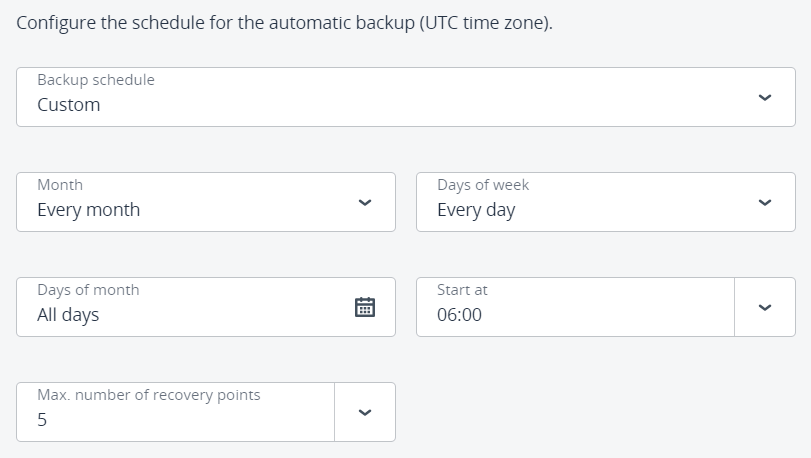
Select Custom to configure a custom schedule for the automatic backup. You can choose months, days of the week, days of the month, time, and the maximum number of full recovery points to keep.
- Click Create.