Dynamically provisioning persistent volumes
Persistent volumes can be dynamically provisioned via persistent volume claims (PVC). A PVC requests for a PV of a specific storage class, access mode, and size. If a suitable PV exists in the cluster, it is bound to the claim. If suitable PVs do not exist but can be provisioned, a new volume is created and bound to the claim. Kubernetes uses a PVC to obtain the PV backing it and mounts it to the pod.
Prerequisites
- A pod and the persistent volume claim it uses must exist in the same namespace.
To dynamically provision a PV to a pod
-
Access the Kubernetes cluster via the dashboard. Click Kubernetes access for instructions.
-
On the Kubernetes dashboard, create a storage class, as described in Creating storage classes.
-
Create a persistent volume claim. To do it, click + Create and specify the following YAML file:
apiVersion: v1
kind: PersistentVolumeClaim
metadata:
  name: mypvc
spec:
  accessModes:
  - ReadWriteOnce
  resources:
    requests:
      storage: 10Gi
  storageClassName: default
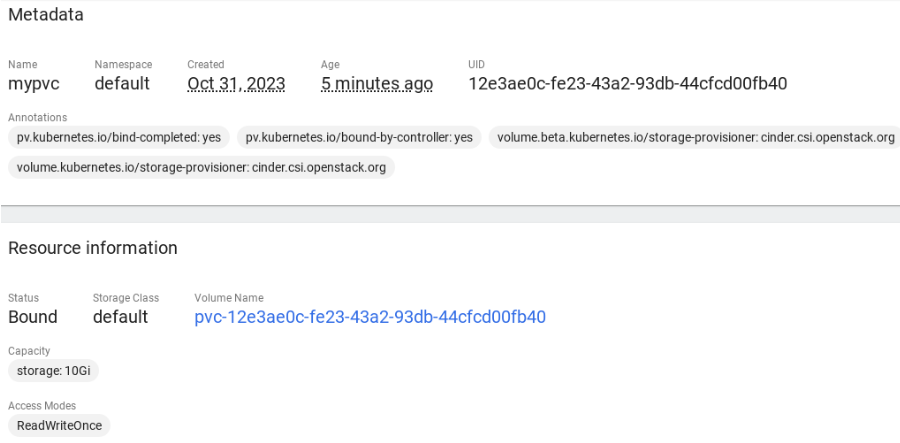
This manifest specifies the persistent volume claim mypvc that requests from the storage class default a volume of at least 10 GiB that can be mounted in the read/write mode by a single node.
Creation of the PVC triggers dynamic provisioning of a persistent volume that satisfies the claim’s requirements. Kubernetes then binds it to the claim.
- Create a pod and specify the PVC as its volume. To do it, click + Create and enter the following YAML file:
apiVersion: v1
kind: Pod
metadata:
  name: nginx
spec:
  containers:
  - image: nginx
    imagePullPolicy: IfNotPresent
    name: nginx
    ports:
    - containerPort: 80
      protocol: TCP
    volumeMounts:
      - mountPath: /var/lib/www/html
        name: mydisk
  volumes:
  - name: mydisk
    persistentVolumeClaim:
      claimName: mypvc
      readOnly: false
This configuration file describes the pod nginx that uses the persistent volume claim mypvc. The persistent volume bound to the claim will be accessible at /var/lib/www/html inside the nginx container.